Google launched Gemini-CLI, a console coding tool similar as Github Copilot CLI and Claude Code. These tools connect your development source code with an AI Model running in the Cloud, or sometimes can connect to an AI model you run locally. Now with the use of MCP (Model Context Protocol) you can increase the knowledge of these tools about your codebase tremendously.
In this blog post, we record some hints about setting up Gemini-CLI so that it can truly interact with your Golang code project and explain what the main benefit of connecting with an AST tool is.
If you don´t yet know what Gemini-CLI is, see the documentation and some example usage on the Gemini CLI Documentation page
Source Code and AST?
Source code is just text. AST is what enables navigating through the codebase. AST is an acronym for the Abstract Syntax Tree of a codebase.
Before we dive into the configuration details of setting up gopls as an mcp server for Gemini-CLI, we have to know how a (remote) AI Large Language Model can successfully interact with your codebase. By default, these types of console tools like Gemini-CLI and Claude code, simply “read your code” the same way as a human developer does. We read some code, see some objects and structs having functions decorated on it, and then we dive into the interface definitions and lookup where these funcs and methods are being called from, to understand the “flow of the program” and make a mind model of that in our heads.
Of course, as humans we also add intent, keep the “main paths highlighted”, but at least we have an idea about what the hierarchy is, what main calls into what package, and what the dependencies of packages that are being called are. The AST is the factual representation of that code model that the AI needs to have access to.
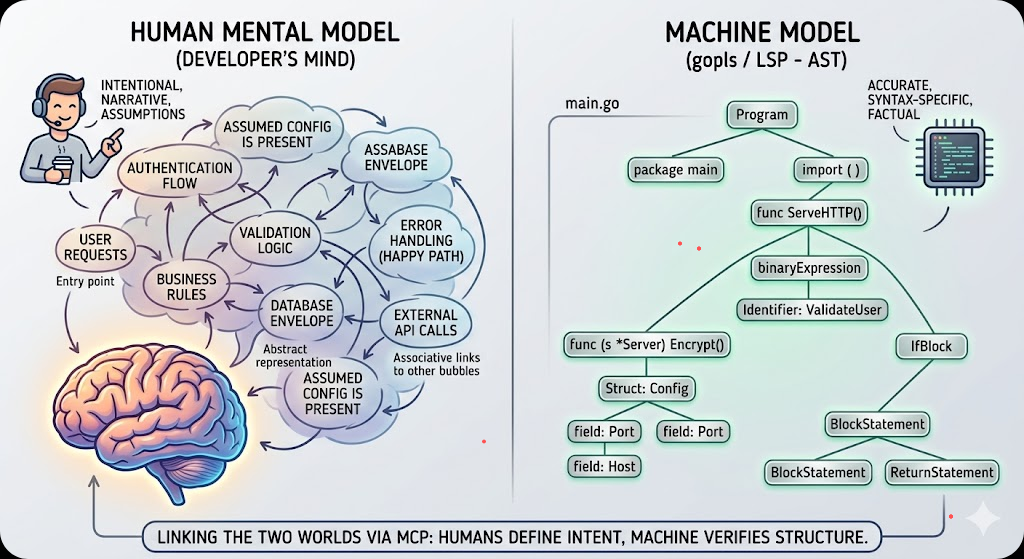
By having this “code graph” in memory, we get an idea of where to make proper additions, changes and refactorings to our code and what unit tests to update or create. Or maybe even add feature enabled paths to strangle code that we consider technical debt.
Now an LLM could try to do exactly the same, by itself, by its own knowledge of coding it learned, but as we know, only reading the code does not mean that an LLM knows the “dependency structure” or “graph structure” of the code that it has just read. It might hallucinate what function name is called from what package.
What if the AI could use the tools that we also use from our IDE’s, our Integrated Development Editors? Think of the tools that are available to us in our code editors!
The tooling that we have available to understand that dependency graph, where funcs are being used in VSCode, for example:
- Go to Definition -> When an object.Func is called, we jump to the definition of the func
- Find All References -> Where is this Func being called from actually?
- Find All Implementations -> Do we have more implementations of this interface func, which ones do we have?
- Etc
Usually, our IDE’s have a bit of knowledge of the underlying programming languages we are working with and it builds up an AST, an Abstract Syntax Tree, to be able to find all the objects/structs that satisfies those functions/methods.
What if our local AI console application could use the same tools? There we have the entry of…
GOPLS as MCP server
Since one of the latest releases, around 0.18+, the gopls tool, can serve the knowledge that it build up as an AST for your IDE like VSCode, can also function as an MCP server for AI tools like Gemini-cli, Continue.dev
If you are already using VSCODE or the non microsoft version of that VSCODIUM, and you work with Golang, these IDE’s will already have advised you to install Gopls and you are probably already making use of that.
Now for Gemini-cli to be able to communicate with that skill-set of GOPLS, you have to configure it for the gemini-cli console app. This can be done with the follwing additional configuration block in your generic “settings.json” for gemini, see the added “mcpServers” block below.
Be sure that the mcpServers block goes inside the global gemini settings.json for universal access, or else a local one for project-specific overrides. Here we add it to the global settings
cat ~/.gemini/settings.json
{
  "hasSeenIdeIntegrationNudge": true,
  "ide": {
    "enabled": true
  },
  "security": {
    "auth": {
      "selectedType": "gemini-api-key"
    }
  },
  "general": {
    "previewFeatures": true
  },
  "mcpServers": {
    "gopls": {
      "command": "gopls",
      "args": ["mcp"]
    }
  }
}
Note for Windows users: the “command”:”gopls” works if gopls is in your PATH. If it is not, you might have to configure the command to specifically point to the executable of your users folder: "command": "/Users/name/go/bin/gopls" where you exchange “name” with the name you login to Windows.
Another note: For gopls to be most effective, it needs to know where the project root is. If you open the Gemini CLI from a subdirectory, and then move into the folder where your go.mod is, sometimes gopls fails to find the go.mod. Advice: You can optionally add the "cwd": "." property in the config. This ensures gopls initializes its workspace starting from the current directory where the user launched the CLI.
Now within the gemini-cli tool (restart it after adding the block above) you can execute “/mcp” to see the additional skills. You will see that the first time you execute the /mcp command, gemini-cli will lookup to understand the configured “mcpServers¨
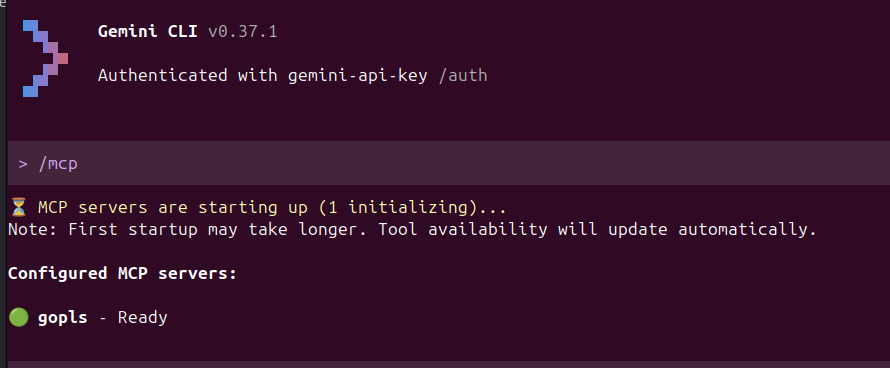
Cool! gopls is ready!
But what does it give? AST has what benefits?
In general, gemini-cli can already read your codebase with the “Codebase investigator Agent”. This gives gemini-cli the capabilities of reading your code. But now with the gopls tool, you are extending it’s capabilities. You give access to the actual understanding of your codebase via the AST.
Here are the benefits:
| Feature | Codebase Investigator (CLI Agent) | gopls (via MCP) |
| Logic Basis | Heuristics & Semantic Search | The actual Go Compiler |
| Type Awareness | Guesses based on text | Knows exactly what every interface implements |
| Dead Code | Hard to detect | Can tell you if a function is never called |
| Refactoring | Might hallucinate variable names | Can safely rename a symbol across the whole project |
| Scope | Sees the whole project broadly | Deeply understands the current module and its dependencies |
As you can see, gopls extends the scope of your AI to be able to interact with actual coding tools that you are already familiar with yourself. From a grunt searching through the code as text, the AI tool suddenly becomes aware of how the source code is actually connected – in other words:
The tool now can see exactly that graph that as developers we are building up in our heads when we think about the code
And that is a huge improvement of code understanding for AI Tools! After installing you have extended the knowledge of the tool from the default tools list of..
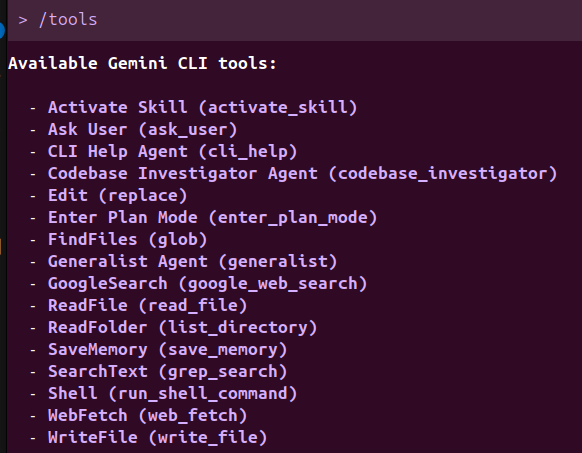
To the new /mcp Model Context Protocol gopls skills of…
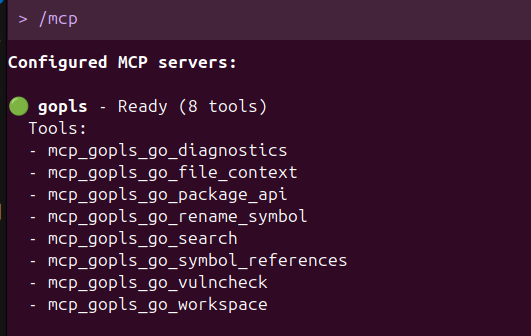
This gives you the basics you need and already strengthens the AI understaning of your codebase tremendously.
If you want to extend further, then you will have to have a look at https://github.com/hloiseau/mcp-gopls that extends the capabilities even further.
See this post on https://www.reddit.com/r/golang/comments/1sji7ss/geminicli_to_use_gopls/ or
Follow this blog on Mastodon or the Fediverse to receive updates directly in your feed.